Showing posts with label java. Show all posts

Friday, 25 November 2016

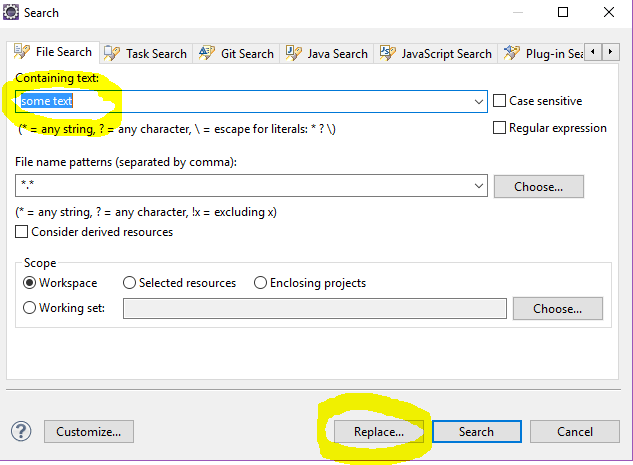
Replace String in all files in Eclipse

Hello everyone,

One of the simple things we often come across while developing projects how to replace the string across all files in the Eclipse project.


Below are the basic steps to Follow:

  • "Search"->"File"
  • Enter text, file pattern and projects
  • "Replace"
  • Enter new text


This is how we should to do while replacing string across all files in Eclipse.

Thanks.

Friday, 29 January 2016

Remember 4 sites for Java programming

Well, there are thousands of sites related to Java programming. But to start, you just need to remember 4 sites which I’m about to tell you now.


* The first site is java.com:

This is the official site for Java trademark. On this site you can verify whether your computer having Java installed or not, and download the latest version of Java. I usually tell my customers go to this website in order to check, download and install Java for their computers.

java.com also introduces some interesting teaching tools like Alice and Greenfoot which allow students or young people to begin learning Java in a fun and easy way with 3D graphics environment. Those are worth exploring.


* The second site is java.oracle.com:

This is the official site for Java technology. It’s the ultimate, complete and authoritative source of technical information about Java.

I often check this site to get updates or download installations and libraries for all Java editions: Java for desktop (Java SE); Java for enterprise (Java EE); Java for mobile (Java ME), etc.


* The third site is The Java Tutorial series:

Oracle (the company owns Java) has its own staffs who are dedicated to write tutorials for beginners. There are two very well-known series:

- The Java Tutorial series: you can find step-by-step tutorials for learning everything about Java core and Swing to build Java desktop applications. Here’s the link:

http://docs.oracle.com/javase/tutorial

- The Java EE Tutorial series: here you can learn everything about Java enterprise such as JavaServer Pages, Servlet… to build Java web applications. Here’s the link:

http://docs.oracle.com/javaee/7/tutorial

I like these tutorials a lot because they help me in the early days of my Java learning. Whenever I need to learn new features, I always start from those tutorials.


* The fourth site is the Javadocs:

As a Java programmer, you will definitely need to check the Javadocs (or Java API) frequently to understand what a class means or what a method does. For example: checking the Collections class and its utility methods. Here are the links:

- Java SE Javadocs: http://docs.oracle.com/javase/8/docs/api

- Java EE Javadocs: http://docs.oracle.com/javaee/7/api

I always bookmark these URLs in my browser for quick reference. I also saved several copies on my computer so I can access the API whenever I need it. Each copy is for a specific version, such as JDK 6, JDK 8, Java EE 6, Java EE 7…


so far I have shared with you the 4 sites that I think every Java programmer should know and visit frequently. Sometimes you can visit java.com or java.oracle.com to check for new stuffs. But the Java Tutorials series are recommended for everyone.

And the Javadocs sites should be bookmarked or better, downloaded and saved as copies for quick reference.

For me, the Javadocs are the documents I read most frequently in my Java programming career. And I think you too (or will too).

courtesy : Nam Ha Minh

Monday, 24 August 2015

Handle UTF8 file with BOM

From Wikipedia, the byte order mark (BOM) is a Unicode character used to signal the endianness (byte order) of a text file or stream. Its code point is U+FEFF. BOM use is optional, and, if used, should appear at the start of the text stream. Beyond its specific use as a byte-order indicator, the BOM character may also indicate which of the several Unicode representations the text is encoded in.
The common BOMs are :

EncodingRepresentation (hexadecimal)Representation (decimal)
UTF-8EF BB BF239 187 191
UTF-16 (BE)FE FF254 255
UTF-16 (LE)FF FE255 254
UTF-32 (BE)00 00 FE FF0 0 254 255
UTF-32 (LE)FF FE 00 00255 254 0 0

UTF8 file are a special case because it is not recommended to add a BOM to them because it can break other tools like Java. In fact, Java assumes the UTF8 don't have a BOM so if the BOM is present it won't be discarded and it will be seen as data.
To create an UTF8 file with a BOM, open the Windows create a simple text file and save it as utf8.txt with the encoding UTF-8.
Now if you examine the file content as binary, you see the BOM at the beginning.

If we read it with Java.

package com.java;

import java.io.BufferedReader;
import java.io.FileInputStream;
import java.io.InputStreamReader;

public class BomExample {

/**
* @author Imroze.Mohammad
*/
public static void main(String args[]) {
try {
FileInputStream fis = new FileInputStream("E:\\demo\\UTF8withBOM.txt");
BufferedReader r = new BufferedReader(new InputStreamReader(fis,
"UTF8"));
for (String s = ""; (s = r.readLine()) != null;) {
System.out.println(s);
}
r.close();
System.exit(0);
}

catch (Exception e) {
e.printStackTrace();
System.exit(1);
}
}
}


The output contains a strange character at the beginning because the BOM is not discarded :
?helloworld
The next example converts an UTF8 file to ANSI. We check the first line for the presence of the BOM and if present, we simply discard it.


package com.java;

import java.io.BufferedReader;
import java.io.FileInputStream;
import java.io.InputStreamReader;

public class BomExample {

/**
* @author Imroze.Mohammad
*/
 public static void main(String args[]) {
   try {
       FileInputStream fis = new FileInputStream("E:\\jeeworkspace\\talend_web_app\\demo\\UTF8withBOM.txt");
       BufferedReader r = new BufferedReader(new InputStreamReader(fis,
               "UTF8"));
       boolean firstLine=true;
       for (String s = ""; (s = r.readLine()) != null;) {
        if(firstLine){
        s=removeBOMChar(s);
        }
           System.out.println(s);
       }
       r.close();
       System.exit(0);
   }

   catch (Exception e) {
       e.printStackTrace();
       System.exit(1);
   }
 }
 
 
 private static String removeBOMChar(String s){
 
 if(s.startsWith("\uFEFF"))
 s=s.substring(1);
return s;
 
 }
 
}


Thursday, 26 June 2014

Spring framework

Introduction

The Spring Framework provides a comprehensive programming and configuration model for modern Java-based enterprise applications - on any kind of deployment platform. A key element of Spring is infrastructural support at the application level: Spring focuses on the "plumbing" of enterprise applications so that teams can focus on application-level business logic, without unnecessary ties to specific deployment environments.

Features

Dependency Injection
Aspect-Oriented Programming including Spring's declarative transaction management
Spring MVC web application and RESTful web service framework
Foundational support for JDBC, JPA, JMS
Much more...

Quick Start

Jars needed for spring framework

1. spring-framework-3.2.9.RELEASE (http://maven.springframework.org/release/org/springframework/spring/3.2.9.RELEASE/spring-framework-3.2.9.RELEASE-dist.zip)
2. asm-2.2.3.jar (http://www.java2s.com/Code/JarDownload/asm/asm-2.2.3.jar.zip)
3. commons logging.jar
4. log4j jar

Once you downloaded this jars ,add to your libraries, you'll be able to do the following:

Example

here we have an interface named MessageService which have getMessage() unimplemented method.

hello/MessageService.java


package hello;
public interface MessageService {
    String getMessage();
}


the above Interface is implemented below

hello/MessagePrinter.java

package hello;

package hello;

public class MessagePrinter implements MessageService {

    private String name;
   
    public String getName() {
return name;
}

public void setName(String name) {
this.name = name;
}

@Override
public String getMessage() {

// TODO Auto-generated method stub
return "Hello "+name;
}
}


hello/Application.java


package hello;

import org.springframework.context.ApplicationContext;
import org.springframework.context.support.ClassPathXmlApplicationContext;

public class Application {

/**
* @param args
*/
public static void main(String[] args) {
ApplicationContext ctx=new ClassPathXmlApplicationContext("spring.xml");
MessagePrinter mp=(MessagePrinter) ctx.getBean("messageprinter");
System.out.println(mp.getMessage());


}

}

spring.xml

<beans xmlns="http://www.springframework.org/schema/beans"
xmlns:xsi="http://www.w3.org/2001/XMLSchema-instance"
xsi:schemaLocation="
      http://www.springframework.org/schema/beans
      http://www.springframework.org/schema/beans/spring-beans-2.0.xsd">

<bean name="messageprinter" class="hello.MessagePrinter">
<property name="name" value="jhon"></property>
</bean>

</beans>


The example above shows the basic concept of dependency injection.Here we are avoiding concept of creating new operator for object initialization.


If your intrested to learn Spring follow these sites which are very useful:
http://www.tutorialspoint.com/spring/index.htm
for video tutorials follow
https://www.youtube.com/playlist?list=PL2882729612B70122

Thursday, 22 May 2014

ZIP and UNZIP with Passwords in Java

Article Summary:
ZIP and UNZIP with Passwords in Java — Zip and Unzip are a very common activities for a computer user. A user normally uses the zip utility to compress a directory to create a zip file. There are many ready-made software such as winzip,7zip, and winrar that are available to achieve this. However, it is also possible to protect the zip file with a password so that the end user has to provide the password to unzip the zip file. This is the very common scenario that can be achieved by a zip utility tool. The significant part of my article is to provide you with the solution to achieve this using a Java program. While developing the project you may encounter a scenario in which you have to create a password-protected zip file that can be unzipped by any zip tool like winzip. Let me provide a complete scenario for your understanding.
Article URL:

Thursday, 15 May 2014

Sending Email with Attachments


//Java program for sending Email

public class SendEmail{
public static void sendEmailWithAttachments(String host, String port,final String userName, final String password, String toAddress,String subject, String 
message, String[] attachFiles)throws AddressException, MessagingException {

// sets SMTP server properties

try {
Properties properties = new Properties();
properties.put("mail.smtp.host", host);
properties.put("mail.smtp.port", port);
properties.put("mail.smtp.auth", "true");
properties.put("mail.smtp.starttls.enable", "true");
properties.put("mail.user", userName);
properties.put("mail.password", password);

// creates a new session with an authenticator
Authenticator auth = new Authenticator() {
public PasswordAuthentication getPasswordAuthentication() {
return new PasswordAuthentication(userName, password);
}
};
Session session = Session.getInstance(properties, auth);

// creates a new e-mail message
Message msg = new MimeMessage(session);
msg.setFrom(new InternetAddress(userName));
InternetAddress[] toAddresses = { new InternetAddress(toAddress) };
msg.setRecipients(Message.RecipientType.TO, toAddresses);
msg.setSubject(subject);
msg.setSentDate(new Date());

// creates message part
MimeBodyPart messageBodyPart = new MimeBodyPart();
messageBodyPart.setContent(message, "text/html");

// creates multi-part
Multipart multipart = new MimeMultipart();
multipart.addBodyPart(messageBodyPart);

// adds attachments
if (attachFiles != null && attachFiles.length > 0) {

MimeBodyPart attachPart = null;
try{
for(int i=0;i<attachFiles.length;i++){
attachPart=new MimeBodyPart();
System.out.println(attachFiles[i]);
attachPart.attachFile(attachFiles[i]);
multipart.addBodyPart(attachPart);
}

     }
// sets the multi-part as e-mail's content
msg.setContent(multipart);
// sends the e-mail
Transport.send(msg);

} catch(javax.mail.MessagingException me) {
System.out.println("Email Not Sent ");
me.printStackTrace();
}
System.out.println("Email sent.");

}

/**
*   * Test sending e-mail with attachments   
*/
public static void main(String[] args) {
// SMTP info
String host = "smtp.gmail.com";
String port = "587";
String mailFrom = "your email address";
String password = "your password";
// message info
String mailTo = "reciepient email";
String subject = "send Email";
String message = "I have some attachments for you.";

// attachments
String attachFiles[] =new String[2]; //no of attachments
attachFiles[0] = "E:/src/names.xml";
attachFiles[1] = "E:/src/rose.png";
try {
sendEmailWithAttachments(host, port, mailFrom, password, mailTo,
subject, message, attachFiles);
} catch (Exception ex) {
System.out.println("Could not send email.");
ex.printStackTrace();
}

}
}