Showing posts with label technology. Show all posts

Thursday, 23 March 2017

Introduction of 'BIG DATA'

This post is regarding the basic introduction of BigData.

Introduction to Big Data

The term ‘Big Data’ is used for collections of large datasets that include huge volume, high velocity, and a variety of data that is increasing day by day. Using traditional data management systems, it is difficult to process Big Data. Therefore, the Apache Software Foundation introduced a framework called Hadoop to solve Big Data management and processing challenges.

Hadoop

Hadoop is an open-source framework to store and process Big Data in a distributed environment. It contains two modules, one is MapReduce and another is Hadoop Distributed File System (HDFS).

· MapReduce: It is a parallel programming model for processing large amounts of structured, semi-structured, and unstructured data on large clusters of commodity hardware.
· HDFS: Hadoop Distributed File System is a part of Hadoop framework, used to store and process the datasets. It provides a fault-tolerant file system to run on commodity hardware.

The Hadoop ecosystem contains different sub-projects (tools) such as Sqoop, Pig, and Hive that are used to help Hadoop modules.

· Sqoop: It is used to import and export data to and fro between HDFS and RDBMS.
· Pig: It is a procedural language platform used to develop a script for MapReduce operations.
· Hive: It is a platform used to develop SQL type scripts to do MapReduce operations.

Note: There are various ways to execute MapReduce operations:

· The traditional approach using Java MapReduce program for structured, semi-structured, and unstructured data.
· The scripting approach for MapReduce to process structured and semi structured data using Pig.
· The Hive Query Language (HiveQL or HQL) for MapReduce to process structured data using Hive.

Friday, 25 November 2016

Replace String in all files in Eclipse

Hello everyone,

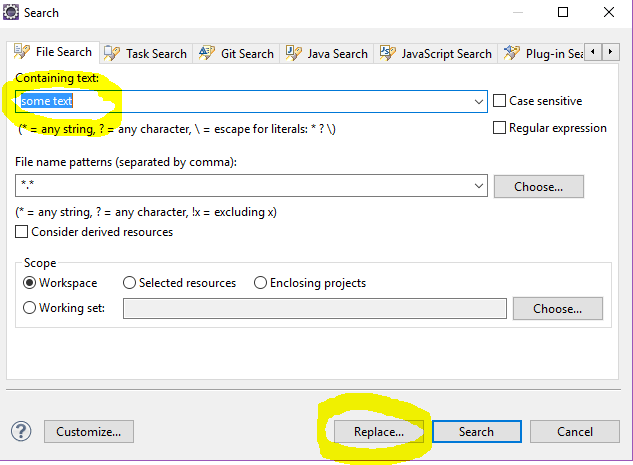
One of the simple things we often come across while developing projects how to replace the string across all files in the Eclipse project.


Below are the basic steps to Follow:

  • "Search"->"File"
  • Enter text, file pattern and projects
  • "Replace"
  • Enter new text


This is how we should to do while replacing string across all files in Eclipse.

Thanks.

Wednesday, 24 August 2016

Understanding JOINs in MySQL and Other Relational Databases

“JOIN” is an SQL keyword used to query data from two or more related tables. Unfortunately, the concept is regularly explained using abstract terms or differs between database systems. It often confuses me. Developers cope with enough confusion, so this is my attempt to explain JOINs briefly and succinctly to myself and anyone who’s interested.

Related Tables

MySQL, PostgreSQL, Firebird, SQLite, SQL Server and Oracle are relational database systems. A well-designed database will provide a number of tables containing related data. A very simple example would be users (students) and course enrollments:

‘user’ table:

MySQL table creation code:
CREATE TABLE `user` (
                `id` smallint(5) unsigned NOT NULL AUTO_INCREMENT,
                `name` varchar(30) NOT NULL,
                `course` smallint(5) unsigned DEFAULT NULL,
                PRIMARY KEY (`id`)
) ENGINE=InnoDB;


id
name
course
1
Alice
1
2
Bob
1
3
Caroline
2
4
David
5
5
Emma
(NULL)

The course number relates to a subject being taken in a course table…

‘course’ table:

MySQL table creation code:

CREATE TABLE `course` (
                `id` smallint(5) unsigned NOT NULL AUTO_INCREMENT,
                `name` varchar(50) NOT NULL,
                PRIMARY KEY (`id`)
) ENGINE=InnoDB;
id
name
1
HTML5
2
CSS3
3
JavaScript
4
PHP
5
MySQL
Since we’re using InnoDB tables and know that user.course and course.id are related, we can specify a foreign key relationship:
ALTER TABLE `user`
ADD CONSTRAINT `FK_course`
FOREIGN KEY (`course`) REFERENCES `course` (`id`)
ON UPDATE CASCADE;
In essence, MySQL will automatically:
·         re-number the associated entries in the user.course column if the course.id changes
·         reject any attempt to delete a course where users are enrolled.
Important: This is terrible database design!
This database is not efficient. It’s fine for this example, but a student can only be enrolled on zero or one course. A real system would need to overcome this restriction — probably using an intermediate ‘enrollment’ table which mapped any number of students to any number of courses.
JOINs allow us to query this data in a number of ways.

INNER JOIN (or just JOIN)

The most frequently used clause is INNER JOIN. This produces a set of records which match in both the user and course tables, i.e. all users who are enrolled on a course:
SELECT user.name, course.name
FROM `user`
INNER JOIN `course` on user.course = course.id;
Result:
user.name
course.name
Alice
HTML5
Bob
HTML5
Carline
CSS3
David
MySQL

LEFT JOIN

What if we require a list of all students and their courses even if they’re not enrolled on one? A LEFT JOIN produces a set of records which matches every entry in the left table (user) regardless of any matching entry in the right table (course):
SELECT user.name, course.name
FROM `user`
LEFT JOIN `course` on user.course = course.id;
Result:
user.name
course.name
Alice
HTML5
Bob
HTML5
Carline
CSS3
David
MySQL
Emma
(NULL)


RIGHT JOIN

Perhaps we require a list all courses and students even if no one has been enrolled? A RIGHT JOIN produces a set of records which matches every entry in the right table (course) regardless of any matching entry in the left table (user):
SELECT user.name, course.name
FROM `user`
RIGHT JOIN `course` on user.course = course.id;

Result:
user.name
course.name
Alice
HTML5
Bob
HTML5
Carline
CSS3
(NULL)
JavaScript
(NULL)
PHP
David
MySQL
RIGHT JOINs are rarely used since you can express the same result using a LEFT JOIN. This can be more efficient and quicker for the database to parse:
SELECT user.name, course.name
FROM `course`
LEFT JOIN `user` on user.course = course.id;
We could, for example, count the number of students enrolled on each course:
SELECT course.name, COUNT(user.name)
FROM `course`
LEFT JOIN `user` ON user.course = course.id
GROUP BY course.id;
Result:
course.name
count()
HTML5
2
CSS3
1
JavaScript
0
PHP
0
MySQL
1

OUTER JOIN (or FULL OUTER JOIN)

Our last option is the OUTER JOIN which returns all records in both tables regardless of any match. Where no match exists, the missing side will contain NULL.
OUTER JOIN is less useful than INNER, LEFT or RIGHT and it’s not implemented in MySQL. However, you can work around this restriction using the UNION of a LEFT and RIGHT JOIN, e.g.
SELECT user.name, course.name
FROM `user`
LEFT JOIN `course` on user.course = course.id
UNION
SELECT user.name, course.name
FROM `user`
RIGHT JOIN `course` on user.course = course.id;


Result:
user.name
course.name
Alice
HTML5
Bob
HTML5
Carline
CSS3
David
MySQL
Emma
(NULL)
(NULL)
JavaScript
(NULL)
PHP
I hope that gives you a better understanding of JOINs and helps you write more efficient SQL queries.

Tuesday, 19 April 2016

Using iconv to change character encodings


Introduction

iconv is used for character set conversion facility. With this command, you can turn a string represented by a local character set into the one represented by another character set, which may be the Unicode character set. Supported character sets depend on the iconv implementation of your system. Note that the iconv function on some systems may not work as you expect. In such case, it'd be a good idea to install the » GNU libiconv library. It will most likely end up with more consistent results.

Detail
The basic command is:
iconv -f old-encoding -t new-encoding file.txt > newfile.txt

You can get a list of supported encodings with (that's a lower-case L, not a one):
iconv -l

Example

iconv -f ISO-8859-1 -t UTF8 sample.txt > sample.txt

It is converting from ISO_8859-1 to UTF8.

Resources


Monday, 24 August 2015

Handle UTF8 file with BOM

From Wikipedia, the byte order mark (BOM) is a Unicode character used to signal the endianness (byte order) of a text file or stream. Its code point is U+FEFF. BOM use is optional, and, if used, should appear at the start of the text stream. Beyond its specific use as a byte-order indicator, the BOM character may also indicate which of the several Unicode representations the text is encoded in.
The common BOMs are :

EncodingRepresentation (hexadecimal)Representation (decimal)
UTF-8EF BB BF239 187 191
UTF-16 (BE)FE FF254 255
UTF-16 (LE)FF FE255 254
UTF-32 (BE)00 00 FE FF0 0 254 255
UTF-32 (LE)FF FE 00 00255 254 0 0

UTF8 file are a special case because it is not recommended to add a BOM to them because it can break other tools like Java. In fact, Java assumes the UTF8 don't have a BOM so if the BOM is present it won't be discarded and it will be seen as data.
To create an UTF8 file with a BOM, open the Windows create a simple text file and save it as utf8.txt with the encoding UTF-8.
Now if you examine the file content as binary, you see the BOM at the beginning.

If we read it with Java.

package com.java;

import java.io.BufferedReader;
import java.io.FileInputStream;
import java.io.InputStreamReader;

public class BomExample {

/**
* @author Imroze.Mohammad
*/
public static void main(String args[]) {
try {
FileInputStream fis = new FileInputStream("E:\\demo\\UTF8withBOM.txt");
BufferedReader r = new BufferedReader(new InputStreamReader(fis,
"UTF8"));
for (String s = ""; (s = r.readLine()) != null;) {
System.out.println(s);
}
r.close();
System.exit(0);
}

catch (Exception e) {
e.printStackTrace();
System.exit(1);
}
}
}


The output contains a strange character at the beginning because the BOM is not discarded :
?helloworld
The next example converts an UTF8 file to ANSI. We check the first line for the presence of the BOM and if present, we simply discard it.


package com.java;

import java.io.BufferedReader;
import java.io.FileInputStream;
import java.io.InputStreamReader;

public class BomExample {

/**
* @author Imroze.Mohammad
*/
 public static void main(String args[]) {
   try {
       FileInputStream fis = new FileInputStream("E:\\jeeworkspace\\talend_web_app\\demo\\UTF8withBOM.txt");
       BufferedReader r = new BufferedReader(new InputStreamReader(fis,
               "UTF8"));
       boolean firstLine=true;
       for (String s = ""; (s = r.readLine()) != null;) {
        if(firstLine){
        s=removeBOMChar(s);
        }
           System.out.println(s);
       }
       r.close();
       System.exit(0);
   }

   catch (Exception e) {
       e.printStackTrace();
       System.exit(1);
   }
 }
 
 
 private static String removeBOMChar(String s){
 
 if(s.startsWith("\uFEFF"))
 s=s.substring(1);
return s;
 
 }
 
}